






Apex Agent: Your Private, Context-Aware AI Companion
Not just another chatbot—Apex Agent is a sophisticated, privacy-first personal assistant designed to live natively on your Android device and act on your behalf.
What is Apex Agent?
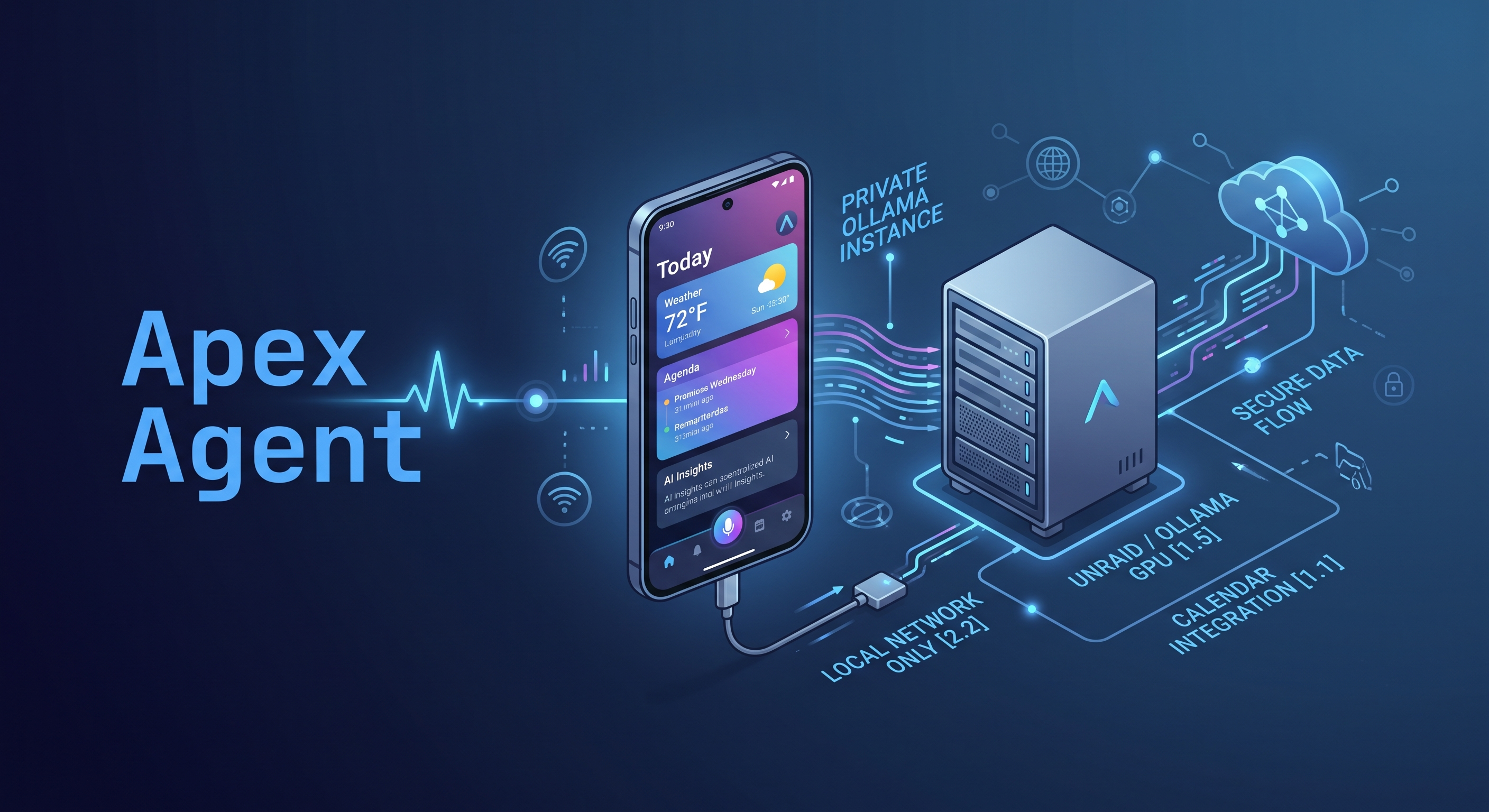
Apex Agent is a high-performance Android application that connects your mobile device to self-hosted or local AI models (via Ollama). It transforms a standard large language model (LLM) into a deeply integrated digital companion that knows your schedule, your location, and your preferences, allowing it to perform tasks rather than just answering questions.
Architecture
How It Works: The Neural Pipeline
1
Private Gateway
Apex connects securely to your own Ollama server. Your data never lives on big-tech servers; it stays in your private cloud or local network.
2
Specialist Models
Utilizes three specialized AI Lanes:
- Casual Voice: Natural, fluid chat.
- Automation Tools: Calendar & SMS actions.
- Document Analyst: File & PDF summaries.
3
Real-Time Grounding
Exa AI and SearXNG integrations enable live web search for up-to-the-minute news, weather, and research.
4
Deep System Actions
Direct device interaction:
- Read, add, or delete Calendar events.
- Draft/send SMS or summarize texts.
- Google Maps route shortcuts.
- GPS-synchronized local weather.
Target Audience
Who is it for?
Power Users
People who want an AI that can actually manage their day, not just talk about it.
Privacy Advocates
Individuals demanding data sovereignty without sacrificing personal information to the cloud.
Self-Hosted Community
Developers running Ollama or SearXNG who want a mobile client leveraging their hardware.
Professionals
High-efficiency users looking to summarize documents and control schedule hands-free.
Core Philosophy
Why do we need it?
The world is full of "cloud-first" AIs that treat your data as a commodity. We built Apex Agent because we believe:
AI should be Action-Oriented
Talking to an AI should result in tasks getting done—not instructions on how to do them yourself.
Privacy is a Right, Not a Feature
You shouldn't have to choose between advanced AI and the security of your texts or location.
Context is King
An assistant that knows the time, the place, and the person provides the ultimate personalized experience.
1
Gateway Addressing & Public Access Security
The Gateway Address in Apex Agent is the domain or public URL pointing directly to your hosted Ollama environment (e.g., https://ollama.yourdomain.com).
Exposing a local Ollama server directly to the open internet without protection creates severe security risks, as unauthenticated third parties could consume your host GPU resources or execute unauthorized inferences. To safely make your Ollama instance accessible over public networks, Apex Agent relies on Cloudflare Tunnels paired with custom Cloudflare Security Rules.
Securing Your Endpoint with Cloudflare Security Rules
Rather than exposing raw IP ports or relying on static application-level keys, access protection is enforced at the Cloudflare edge before traffic ever touches your home server:
- Cloudflare Tunnel (cloudflared): Creates a secure, outbound-only connection between your server and Cloudflare’s global edge network. This eliminates the need to open incoming ports (like
11434) on your home router or expose your public IP address. - Cloudflare WAF / Access Security Rules: Enforce strict firewall and access rules directly within your Cloudflare dashboard (under Security > WAF > Custom Rules or Zero Trust Access Policies). You can configure targeted rules—such as IP geolocation filtering, user-agent validation, rate limiting, or client challenge barriers—ensuring that only requests originating from your authorized Apex Agent client are allowed through to your Ollama instance. Unwanted or malicious bot traffic is automatically dropped at Cloudflare's edge.
🛡️
Cloudflare Custom Rule Configuration
Rule NameLock Down Ollama CoreGive your rule a descriptive name.
ActionBlockBlocks matching requests and stops evaluation.
Execution OrderFirstEvaluated sequentially in order.
StatusActive
When Incoming Requests Match...
| Field | Operator | Value | Logic |
|---|---|---|---|
Hostname | equals | [your-hostname] (your public domain name for your ollama instance) | AND |
Header (x-api-key) | does not equal | [your-secret-key] (secret key used to access your Ollama instance) | AND |
Header (authorization) | does not equal | [your-secret-key] (secret key used to access your Ollama instance) | End |
Raw Expression Syntax (Cloudflare Expression Builder)
If you need the rule in code or text form for guide documentation, copy the standard expression structure below:
(http.host eq "[your-public-domain-name]") and (http.request.headers["x-api-key"][0] ne "[your-secret-key]") and (http.request.headers["authorization"][0] ne "[your-secret-key]")2
SearXNG Optimization: settings.yml Reference
To ensure zero-latency web search parsing for local AI grounding, your self-hosted SearXNG instance must be explicitly configured to permit raw programmatic access while pruning unstable upstream search engines.
Technical Rationale Behind Configuration Values
formats: [json]SearXNG defaults to HTML rendering. Enabling the
json format flag allows Apex Agent to programmatically extract raw, structured search payloads without HTML web-scraping overhead.request_timeout: 3.0sPrevents sluggish third-party search engines from stalling the agent response flow. If a search engine fails to respond in 3 seconds, its connection is aborted.
source_ips: ["0.0.0.0"]Binds outbound requests strictly to IPv4 address spaces, bypassing residential/VPS IPv6 network routing drops commonly experienced with open metasearch engines.
Engine Pruning (Disabling Google/Brave/Qwant)Primary commercial engines trigger aggressive Cloudflare/DataDome CAPTCHAs and 180-second rate-limit suspensions on automated queries. Disabling them in favor of DuckDuckGo, Wikipedia, and Google News ensures 100% reliable execution.
🔍
SearXNG Optimization: settings.yml Reference
To ensure zero-latency web search parsing for local AI grounding, your self-hosted SearXNG instance must be explicitly configured to permit raw programmatic access while pruning unstable upstream search engines.
settings.ymlYAML
# Read the documentation before extending the defaults:
# https://docs.searxng.org/admin/settings/

use_default_settings: true

server:
  secret_key: "MYSECRETPASSWORD"
  image_proxy: true

search:
  formats:
    - html
    - json

outgoing:
  request_timeout: 3.0       # Max wait per search engine (seconds)
  max_request_timeout: 6.0   # Total query hard limit
  enable_http2: true
  source_ips:
    - "0.0.0.0"              # Binds outgoing traffic to IPv4

engines:
  # --- STABLE & UNLIMITED AGENT ENGINES ---
  - name: wikipedia
    disabled: false
  - name: duckduckgo
    disabled: false
  - name: google news
    disabled: false

  # --- DISABLED (IPv6 ROUTING, CAPTCHAS & RATE-LIMIT ENGINES) ---
  - name: mojeek
    disabled: true           # Disables Mojeek connection drops
  - name: qwant
    disabled: true           # Disables DataDome CAPTCHA blocks
  - name: brave
    disabled: true           # Disables 180s rate-limit suspensions
  - name: google
    disabled: true
  - name: bing
    disabled: true
Technical Rationale Behind Configuration Values
formats: [json]SearXNG defaults to HTML rendering. Enabling the
json format flag allows Apex Agent to programmatically extract raw, structured search payloads without HTML web-scraping overhead.request_timeout: 3.0sPrevents sluggish third-party search engines from stalling the agent response flow. If a search engine fails to respond in 3 seconds, its connection is aborted.
source_ips: ["0.0.0.0"]Binds outbound requests strictly to IPv4 address spaces, bypassing residential/VPS IPv6 network routing drops commonly experienced with open metasearch engines.
Engine Pruning (Disabling Google/Brave/Qwant)Primary commercial engines trigger aggressive Cloudflare/DataDome CAPTCHAs and 180-second rate-limit suspensions on automated queries. Disabling them in favor of DuckDuckGo, Wikipedia, and Google News ensures 100% reliable execution.
3
Native System Integrations & Action Mechanics
🗺️ Google Maps Navigation
Instead of wasting tokens having the LLM describe directions textually, Apex Agent uses spatial awareness (GPS sync) to generate targeted Intent URIs (geo:0,0?q=destination).
How It Works: When location intent is classified, Apex generates an interactive "Open in Maps" deep-link chip that directly launches Google Maps with your pre-calculated navigation route ready.
📅 Google Calendar Integration
Bypasses heavy OAuth server tokens by querying Android's native CalendarContract Content Provider directly on-device.
How It Works: Apex reads upcoming instances, recurring events, and event details locally in sub-50ms. It can draft, insert, or delete events instantly, fueling the Today Dashboard agenda view.
💬 Contacts Resolution & SMS Dispatch
Enables voice-activated messaging without uploading your address book to third-party cloud servers.
How It Works: When you say "Text Sarah I am running 10 minutes late", the Automation Tools lane queries Android's local ContactsContract provider to match "Sarah" to a verified phone number. Apex drafts the message payload and presents an interactive confirmation sheet before dispatching via native SMS intents.
⚡
More System Integrations & Automation Connectors Coming Soon
4
Real-Time Grounding: Provider Configuration
Web Grounding elevates Apex Agent beyond model pre-training limits by fetching live, up-to-the-minute web search context prior to model synthesis. Whether you are checking live breaking news, hyper-local weather, current sports scores, financial market shifts, technical documentation, or querying virtually anything in general across the internet, grounding ensures your agent's knowledge remains dynamically factual and never out-of-date.
Option A
Exa AI (Cloud Neural Synthesis)
Uses Exa's /answer endpoint to stream grounded conversational answers with inline citations.
- Navigate to Settings > Web Grounding.
- Select Exa AI as the provider.
- Paste your Exa API key from
exa.ai.
Option B
SearXNG (100% Private Metasearch)
Queries your self-hosted SearXNG Docker container over local JSON endpoints without cloud tracking.
Setup Steps:- Navigate to Settings > Web Grounding.
- Select SearXNG as the provider.
- Enter your base URL (e.g.,
http://192.168.1.100:8080).
5
Specialist Model Selection Matrix
Apex Agent features a multi-lane routing architecture that directs incoming prompts to the best model for the task:
🗣️ Casual Voice Lane
Requires high-speed, sub-second token generation for real-time text-to-speech audio loops.
Llama 3.2 (3B) / Qwen 2.5 (3B)
⚙️ Automation Tools Lane
Requires strict instruction-following and JSON function-calling accuracy for system actions.
Qwen 2.5 (7B/14B) / Llama 3.1 (8B)
📄 Document Analyst Lane
Requires large context window comprehension for parsing complex PDFs and text attachments.
DeepSeek-R1 / Qwen 2.5 Coder
6
Custom Persona Architecture
The Custom Persona Configuration anchors the LLM's behavioral rules, vocal cadence, and tool-handling policies. Without system persona guardrails, raw LLMs tend to generate verbose markdown symbols (e.g., **bold**, code blocks, bullet points) that break Text-To-Speech audio playback.
How Apex Agent Uses Predefined Personas
Apex Agent dynamically injects a system instruction header into every conversation thread based on your settings profile:
- Voice Scrubbing Rule: Explicitly forbids special characters or structural symbols in conversational outputs to ensure smooth, natural voice reads.
- User Context Anchoring: Injects your bio, spatial coordinates, time zone, and preferred measurement scale directly into the prompt header so the model remains contextually aware without extra instructions.
- Tone Adjustment: Dynamically switches between Casual (conversational prose), Professional (concise executive briefs), and Technical (detailed structural responses) depending on the selected profile persona.